II. The Lean Marketing Stack
Using Google Webmaster Tools
Webmaster Tools has always been in the shadow of Google’s much larger Analytics tool. However, there’s some hidden functionality in here that you can use to track the effectiveness of your search engine optimization work.
Tracking search queries
The SSL conundrum
In 2011, Google implemented secure search (https://google.com) as a default for all users. Search Engine Land explained what this change meant for site owners:
When someone searches Google, it is now always done as an SSL encrypted search, so all search queries are now encrypted. It routes the click to the website through a redirect so that the website a user lands on has no idea what actual keywords the searcher found the website under, and what keywords were used that brought the person there.
When using Google Analytics, you could no longer see organic keywords (the terms people were using to find your site).
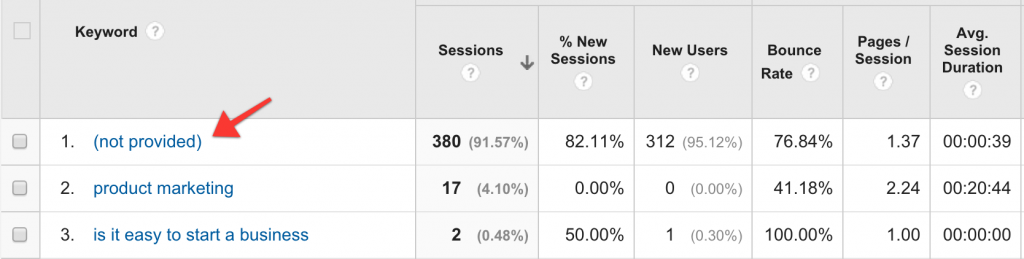
Google no longer provided organic keywords in Analytics
Webmaster Tools to the rescue
Here’s a secret: you can find your keyword data in Google’s Webmaster Tools. Go to google.com/webmasters and then navigate to Search Traffic >> Search Analytics.
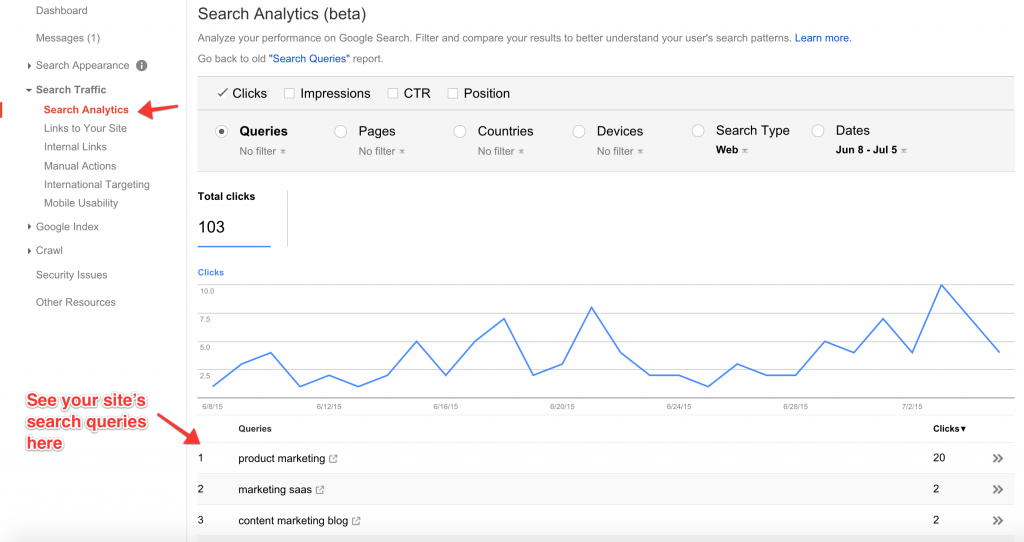
You can now find keyword data in Google Webmaster Tools
This new report, introduced in May 2015, provides a more accurate picture of search data. Broadly, for Queries, it will provide these metrics:
- Queries: which Google search queries show your site.
- Clicks: the number of clicks for that query (people who clicked on your search result, and visited your site).
- Impressions: how many times your search result was viewed in a Google search.
- CTR (Click-through rate): this is the percentage of clicks divided by the number of impressions for that query.
- Position: this is the average position of your site on Google search results.
Along with Queries, you can group your data by Pages (individual pages on your site and how they rank), Countries, Devices (desktop, mobile, or tablet), and Search Type (web, image, video).
How to use this data
First, your site will need to have some history for Search Analytics to be helpful. If you haven’t been writing blog posts, creating landing pages, and accruing inbound links there won’t be much to show here.
Once your site is indexed by Google and is ranking for a few keywords, the data in Search Analytics will become more useful. Here are the questions you should be asking of your data:
- For which search queries is my site ranked 1–5? Finding out where your pages are ranking high will help you double-down on queries that are working well. Put out more targeted content aimed at these keywords. These could be landing pages or blog posts that illustrate how your product answers that query.
- For which search queries is my site ranked lower, 9–15? You can improve your position for these queries! The queries here should provide you with ideas for new content: blog posts, landing pages, and articles. Include the query’s keywords inside the title of your new page. This approach should help you rank higher for these queries.
- Which queries are giving me the most impressions? You’ll see that certain keywords get far more views than others. Focus on those!
- How many click-throughs am I getting? The most important metric is how many people are visiting your site from these search queries. Look for ways you can improve your click-through rate.
Grouping by Pages and filtering by click-through rates can be particularly helpful in learning what types of content people are searching for on Google.
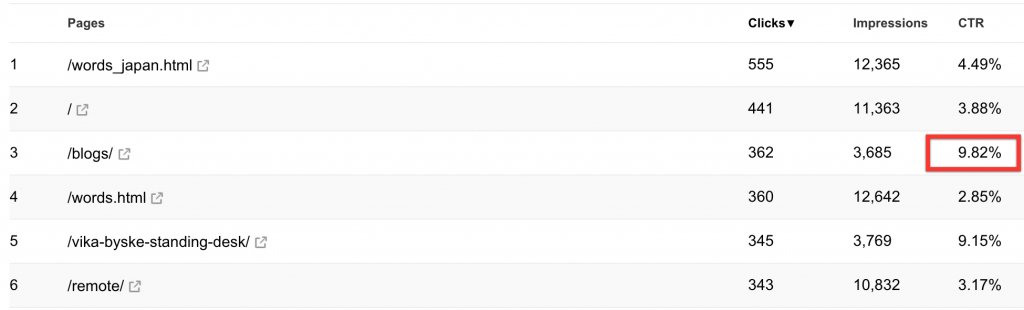
Group by Pages to see which pages have the highest CTR
You’ll also want to watch for dips and spikes. These could be due to a crawl error (Google can no longer find a page on your site), or an algorithmic penalty (Google has tweaked their ranking algorithm, and your site is being penalized.
Each year, Google changes its search algorithm around 500–600 times. While most of these changes are minor, Google occasionally rolls out a “major” algorithmic update (such as Google Panda and Google Penguin) that affects search results in significant ways.
- Moz
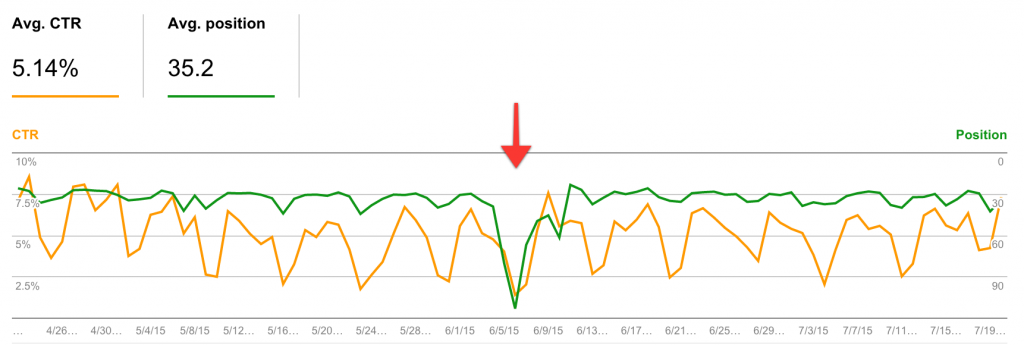
Use Search Analytics to watch for dips and spikes
Is your site mobile friendly?
In November 2014, Google started adding a “Mobile Friendly” label to search results that rendered correctly on mobile devices.Helping user find mobile-friendly pages, November 18, 2014
The next year, in April, Google also announced that sites that were not mobile friendly would be penalized by their ranking algorithm.Finding more mobile-friendly search results, February 15, 2015
You’ll want to ensure that your marketing site is mobile friendly. Google has built a utility into Webmaster Tools1 to do that.
The utility will show you how their Googlebot sees your web page and whether it passes their mobile test. If your page does not pass, it will tell you why and give you steps to remedy the problem.
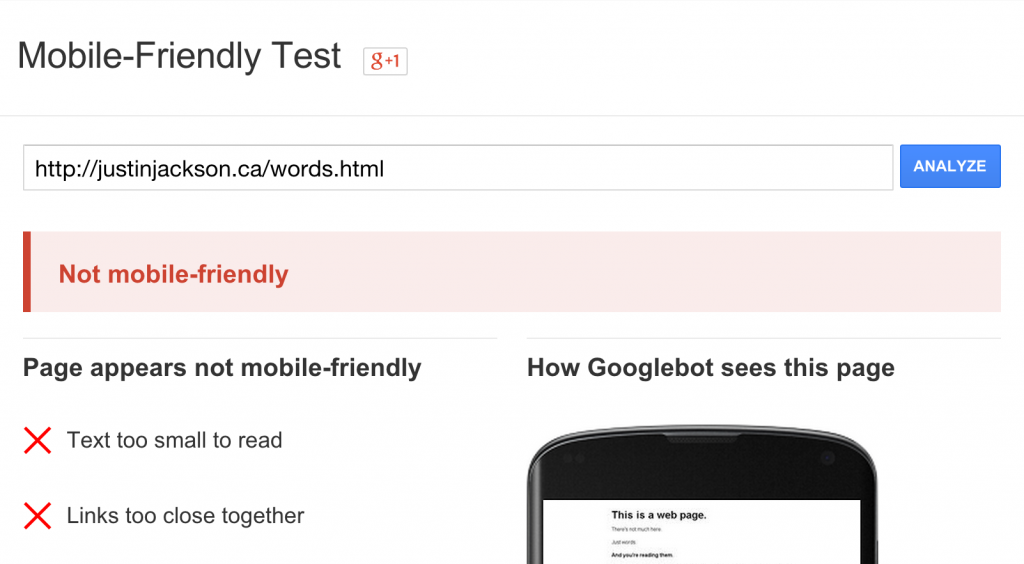
Google’s Mobile-Friendly Test
If your pages aren’t mobile friendly, it might be time to update your site’s design. Take a look at The Lean Marketing Stack: Overview chapter for recommendations on good site templates.
Footnotes
-
google.com/webmasters/tools/mobile-friendly/ ↩
Buy the EPUB & PDF to read offline and support the work.
Buy the book — $10